Now that I've gotten to grips with making Python scripts that work, I'm paying more attention to readability and style. I've had the PEP 8 Style guide for Python Code recommended to me as a good standard to follow.
Here is a quick code snippet for calling a Python script from Substance Painter and parsing the results. The in/out is very simple, but serves as an example of using the alg.subprocess.check_output function to bridge the JS api and your own Python scripts. // This can be called from the QML UI, or elsewhere in the plugin code. function GetAllFilesInDirectory(root) { if (root == undefined) return; // I put my scripts in a relative path to keep my plugin tidy. var script_path = "Scripts/FileUtils.py"; // Gathering files var ret = "NOSTRING"; try { // The arguments are used as parameter inputs to the Python script. This requires some planning // and well communicated conventions, but works well enough. ret = alg.subprocess.check_output( [ pypath, // Absolute path to interpreter. script_path, // Relative path to the py script. "log_files_of_type", // sys.argv[1], in this case the python ...
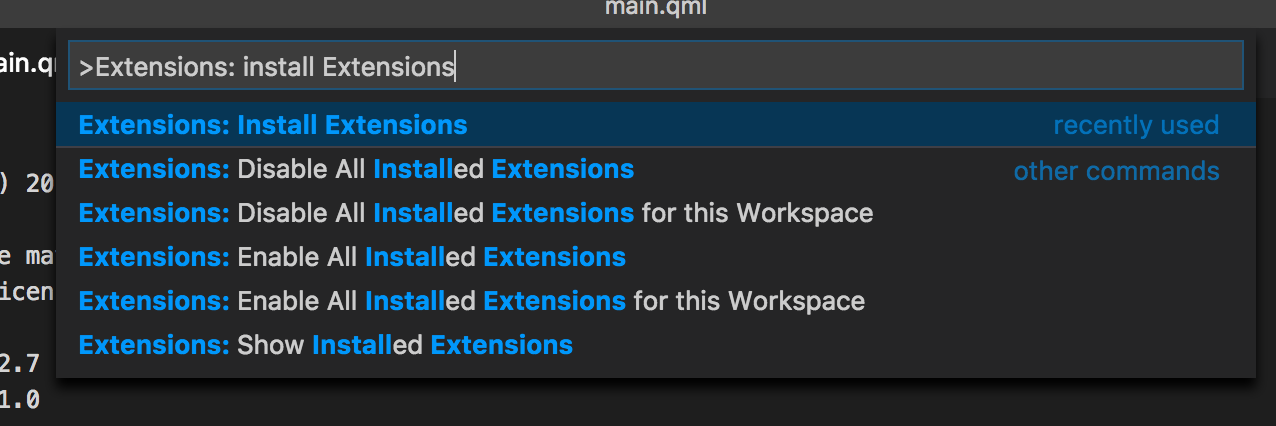
Substance Painter plugins use the QT Meta Language , or QML files to build their interface. From Wikipedia: It is a JSON-like declarative language for designing user interface–centric applications. Inline JavaScript code handles imperative aspects. It is part of Qt Quick, the UI creation kit developed by Nokia within the Qt framework. Using this information, we can start building a window with a button to execute our script. Visual Studio Code For this tutorial I’m going to be using Visual Studio Code , a lightweight IDE from Microsoft. It’s not the same thing as Visual Studio, but it’s a nice scripting editor that’s available on Mac, Linux and PC. Other text editors like Sublime will do the job quite well. Installing QML Syntax Highlighting By default, QML files will appear as ordinary text files in Visual Studio Code. While this won’t stop you from being able to write the plugin, adding some QML support will make reading, organizing and editing our script easier. To do this, I’...
So... this is what I have been working on since leaving Bluetongue Entertainment in 2011: KitchenSinkCube SKU coming soon... Rise of the Guardians is finally out in North America on pretty much any platform you want. Almost any platform anyway. I was one of two level artists for the duration of the project, and I've updated my portfolio website with screenshots of some of my work. The game is based closely on the environs of the Dreamworks movie of the same name. In all there were roughly 35 levels that had to be created for the final game which meant that the turn around for each of them was pretty rapid. My favorite level to work on was the snowy Yeti Village. There is something really fun about making ramshackle bridges across deadly, deadly ravines: The Yeti Village level from Rise Of the Guardians The Video Game. The game was developed by Torus Games and published by D3Publisher .

Comments
Post a Comment