Posts

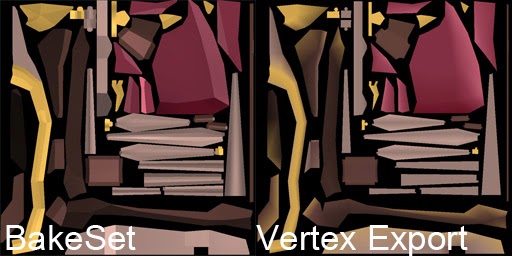
Maya- Bake Vertex colors to Texture using Mental Ray.
Image
This is a technique to get the Vertex colors from your model baked to a texture using a Mental Ray bakeset. One method of getting vertex colors from a mesh to a texture is using the Paint Vertex Color tool's 'export' option under 'attribute maps'. This is pretty good for higher poly models, but falls apart on low poly models that might have vertex colors assigned per face rather than per Vert. On these models, the results will look muddy, as there are not enough verts to carry the info. The other draw back of the Paint Vertex Color tool's export option is that it has no texture padding built in, so whatever colors you get out will be riddled with seams. I like to use the Mental Ray bake sets to get lighting and color information from Maya to Photoshop. Although it doesn't handle vertex color straight off the shelf, its pretty easy to set it up by making a shader that reads the model's vertex colors. On left- Sharp details preserved, padding enabled. On r...

Model Monkey: Now with Configs!

Image
I've decided to use ini files to make it easier to port my Maya exporter across different projects with as little fuss as possible, using the standard Python ConfigParser module. The last time I really played around with .ini files was to mess with Command and Conquer Red Alert, and that was some time ago. It's really awesome that the .ini file format is still worth using today. There is a bug where you can add new file rules until the tool grows so long it is bigger than the screen. Time to add a scroll bar... Part of getting this to work includes creating a GUI interface to minimize the manual file editing that you might expect. Being my first major use of an .ini for a tool (I did use a teeny tiny .ini on Texture Monkey) I suddenly realized that I had to re-work a lot of my previous configuration code in order to make my tool flexible enough to be re-configurable without breaking into a million different lame parts. BUT! It's working now, whoo! A couple of things have to...

Unity4.3 Released

Image
Unity 4.3 has just been released ! As a Unity Developer this is awesome news, especially with the new native 2d toolkit that has been included with this release. The new 2d tools... spritey goodness.  We have been using the Unikron Software 2d toolkit for all of our sprites in game so far, and it is a pretty well fleshed out package, although a little cumbersome to use. I'm very interested to see how the new native 2d toolkit performs on mobile devices, and if it does perform well, what kind of workflow enhancements it will provide.

Maya Exporter: Tabs and Tools!

Image
I've been chipping away at my Maya Exporter and have a few Photoshop functions tied into it now, along side the original exporter functionality. Behind the scenes the Photoshop commands are built on Standard modules, using Subprocess and some string manipulation in order to get JavaScript commands to the Photoshop application. As the tool has expanded beyond it's initial export-only functionality, there has been a decent amount of clean up and re-factoring behind the scenes to make sure that it doesn't just turn into a mega-script. Maya-side functions and Photoshop functions have been split into separate classes and files from the GUI, which has made keeping track of the code a lot easier. The GUI is built using the Pyside QT Libraries, which comes standard with Maya 2014. Next on the list, adding the option to load different project environments.

Python Photoshop Automation without win32com- The Example

Image
So here is a working example of what I was talking about in my last blog post- making Photoshop automation possible without needing to use the win32com module. This specific example is not cross-platform compatible. It relies on getting the Photoshop application through it's registry entry, but the subprocess module is cross platform so it shouldn't be too hard to hammer this into a shape that can be used on Mac and PC. Or just Mac. Or whatever. Essentially there is no real magic going on here, just lots of string manipulation behind the scenes. Like I said in my last post, the biggest hole in this right now is the lack of feedback from Photoshop, but that's something I'm looking into when I get a few spare minutes here and there. Here is the example. When you run it, you should come up with something that looks like this: What an Amazing document.  And the code! This is a particularly long snippet. Hang in there! Essentially when the commands are called, like add_new_...

Python Photoshop Automation without win32com.

Clunky but kinda fun, its possible to automate Photoshop using Javascript files passed as arguments to the subprocess.  Although this essentially means you have to write your script in two languages (PS's native JS and Python for pipeline) the practical aspect of this is that it allows scripts to be written that do not require people to have the win32com/comtypes modules installed, and paves the way for cross platform scripts that aren't tied to windows only modules.  I've had some success with creating a dynamic JavaScript builder that wraps Python functions around Photoshop's native Javascript commands. When the list of commands is executed it is compiled into a jsx file and then passed on to the Photoshop subprocess as an argument. The only short coming right now is obtaining the output from Photoshop and making it into a two-way street. I have some ideas on how to do this, and will update with the solution I end up using. 

Zbrush Speedsculpt: Cup

Image
I didn't choose this theme this week, but it was a great chance to abuse the radial symmetry brush for my own nefarious cup-theme related purposes. This was a true speed sculpt and was completed under the hour. Yes. Technically a goblet is still a cup.